Secret updates through ServiceNow, applied automatically
A requester submits the AWS Secrets Manager form. Once it is approved, a Lambda validates the request, updates the secret in the target account, and writes the outcome back to the ticket.
- Environment
- UAT (ServiceNow test instance, AWS accounts a0023 and a0189)
- Where it stands
- Core flow tested
- Production date
- To be confirmed. After the UAT review and the final input test.
UAT status
- All test cases are tested in UAT and everything is working as expected.
- Alerts (CloudWatch alarm and SNS) and the scheduler are not set up in UAT. They will be set up in production.
- The UAT review is pending.
- Next: once we finalise how input values are passed, we test that final input format in UAT, then move to production.
Architecture
The approved design has four parts: ServiceNow holds the request, a Lambda in a central automation account does the work, a role in the target account lets the Lambda change one secret, and logging and alerts record what happened. Nobody handles the secret values by hand.
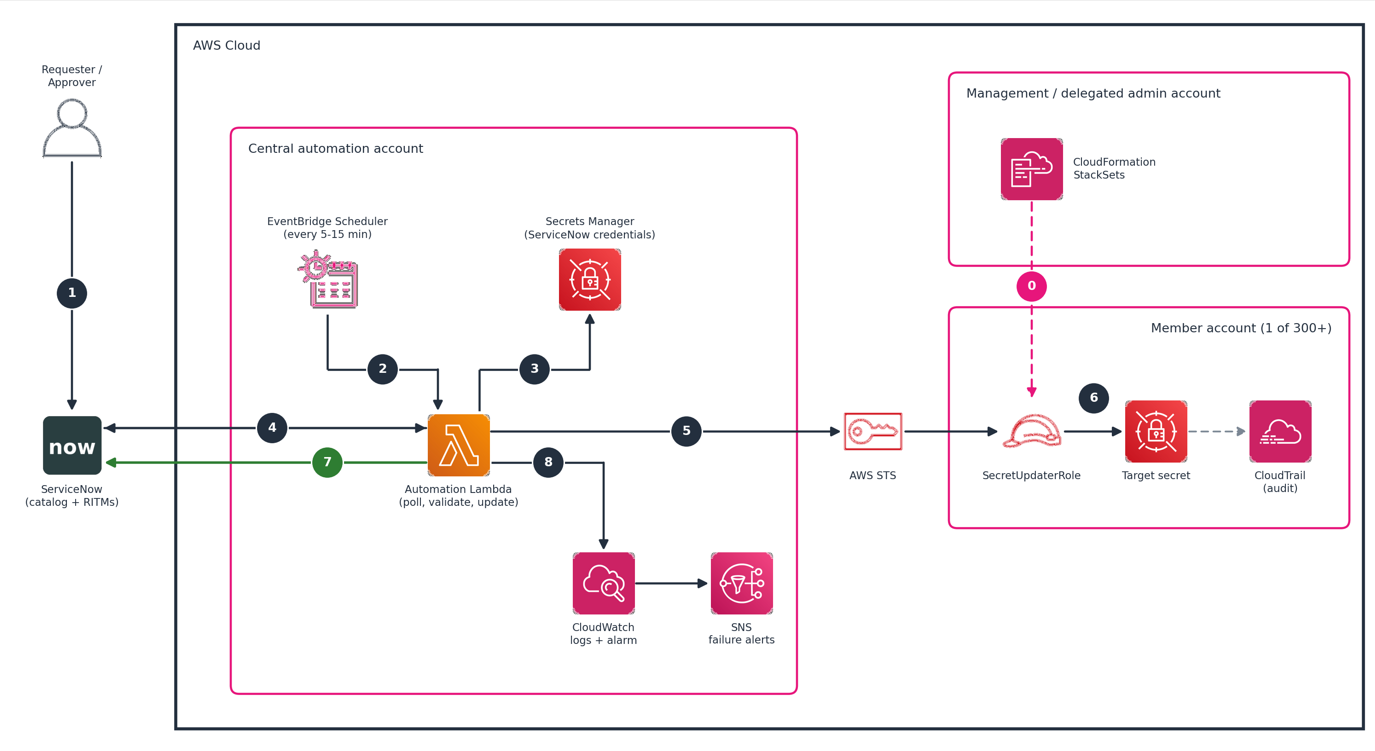
| Step | What happens | In our build |
|---|---|---|
| 0 | One time: CloudFormation StackSets deploys SecretUpdaterRole to every member account. | Not yet The UAT role was created manually in a0189. |
| 1 | The requester submits the request in ServiceNow and the approver approves it. | Working In UAT, the ServiceNow team sets Approved from the backend. |
| 2 | EventBridge Scheduler triggers the Lambda every 5 to 15 minutes. | Production only Not needed in UAT, where the Lambda is triggered manually. Set up with the production resources. |
| 3 | The Lambda reads the ServiceNow credentials from Secrets Manager. | Working |
| 4 | The Lambda queries approved requests and works through each one. | Working Reads the custom form table. |
| 5 | The Lambda assumes the update role in the target account through STS. | Working Tested against a0189. |
| 6 | The role checks the secret, merges the requested keys, and writes the new value. CloudTrail in the member account records it. | Working Keys added without touching the others. |
| 7 | The Lambda adds work notes and closes the request, or marks it failed. | Working Work in progress, Closed and Cancelled all confirmed. |
| 8 | Logs go to CloudWatch, and an error alarm notifies SNS. | Partly Lambda logs exist. The alarm and SNS topic are set up with the production resources, not in UAT. |
Where the build differs from the diagram
- The form is a custom application table, not a catalog RITM, so the Lambda reads that table directly.
- The Lambda validates a request before moving it to Work in progress. A request with a problem goes straight to Cancelled, so a ticket never sits in progress for something that was wrong from the start.
- Cancelled is a second outcome next to Closed. The work note lists everything that was wrong, and the ServiceNow team handles those requests.
- The target account is derived from the secret name (
aws-a0xxx-use1-...) and cross-checked against the form, so users entera0xxxand no region field is needed.
What is provisioned in UAT
| Component | Where | Details | Status |
|---|---|---|---|
| Main Lambda | a0023 (954473325746) | Secret-update. Polls approved requests, validates, updates the secret, writes back to ServiceNow. | Provisioned |
| Lambda execution role | a0023 | Secret-update-role-lnplog68. May assume the update role and read the ServiceNow credentials. | Provisioned |
| ServiceNow credentials | a0023, Secrets Manager | Integration user's credentials, read by the Lambda at run time. | Provisioned |
| Secret update role | a0189 (786061192357) | secret-manager-update-shruti01. Trusts only the Lambda's execution role. Production uses SecretUpdaterRole rolled out by StackSets. | Provisioned |
| Target account | a0189 | The account whose secret is updated. | Provisioned |
| Secret Manager | a0189, us-east-1 | aws-a0189-use1-00-d-test-demo01 | Provisioned |
| ServiceNow form | UAT instance | Table x_zsaip_aws_secr_0_aws_secrets_manager, built by the ServiceNow team. | Provisioned |
| Test request | ServiceNow | AWS0001059 | AWS Secrets Manager | ZS | Provisioned |
| Where the Lambda checks | ServiceNow | Approved requests in AWS Secrets Managers | ZS | Provisioned |
| Scheduler | Production | EventBridge Scheduler, every 5 to 15 minutes. Not needed in UAT, where runs are manual. | Production only |
| Alarm and alerts | Production | CloudWatch alarm on errors, SNS topic for failure alerts. Not needed in UAT. | Production only |
| Role rollout | Management account | StackSets deploying the update role to all member accounts. | Not yet |
Everything above is UAT. Production-ready resources are provisioned after go-live, once validation is complete in UAT (see When it goes to production).
Try a request
Pick a scenario to see what the automation does and which work note lands on the ticket. The notes are the same text the Lambda writes.
Scenario
Test cases in UAT
These cases ran through the Lambda against the UAT ServiceNow instance, and each one behaved as expected. Select a screenshot to enlarge it.
| Case | Request | What was submitted | Result |
|---|---|---|---|
| Valid request | AWS0001079 | Existing secret, two key/value pairs | Closed Both keys added, completion note written |
| Secret doesn't exist | AWS0001080 | Correct name format, but no such secret in a0189 | Cancelled Nothing changed in AWS, work note explains why |
| Bad name and no pairs | AWS0001076 | Secret name jhgf, no key/values | Cancelled Both problems listed in one note |
| No key/value pairs | AWS0001069 | Valid name, key/value box empty | Cancelled Note says no key/value pairs were provided |
Case 1: valid request, closed by the automation
- AWS Account
- a0189
- Secret Manager Name
aws-a0189-use1-00-d-test-demo01- Key/values
12345= numbers,K= Shrutika- Outcome
- Work in progress then Closed. Both keys were added to the secret.
AWS Secret Manager (integration user)Work notes, 2026-10-29 02:41:29
All inputs were validated and secret 'aws-a0189-use1-00-d-test-demo01' (a0189, us-east-1) can be updated. Keys to add: 12345, K. Keys to update: none. Updating now.
AWS Secret Manager (integration user)Work notes, 2026-10-29 02:41:29
Completed by automation. Values were added/updated in secret 'aws-a0189-use1-00-d-test-demo01' (a0189, us-east-1). Keys added: 12345, K. Keys updated: none.
Case 2: secret doesn't exist, cancelled by the automation
- AWS Account
- a0189
- Secret Manager Name
aws-a0189-use1-00-d-shru-demo02(does not exist)- Key/values
shdisocdsckdsv= secret,swdbhewfhkjfark.com= number_endpoint- Outcome
- Cancelled with a work note. The name and keys were valid, so the Lambda checked AWS, found no such secret, and changed nothing.
AWS Secret Manager (integration user)Work notes, 2026-10-29 02:59:47
Request cancelled by automation. No changes were made to the secret.
Problems found:
1. Secret 'aws-a0189-use1-00-d-shru-demo02' does not exist in account a0189 (us-east-1)
Please correct the request details and resubmit, or contact the Cloud team.
Case 3: no key/value pairs, cancelled before AWS is touched
- Request
- AWS0001069
- AWS Account
- a0189
- Secret Manager Name
aws-a0189-use1-00-d-shru-app01- Key/values
- None provided
- Outcome
- Cancelled straight from the input checks, with no AWS calls made.
Cancelled scenarios
A request is cancelled as soon as any of these is found. All problems found are listed together in the work note, and no secret values are ever written to notes or logs.
Input problems (no AWS calls made)
- Secret name isn't in the format
aws-a0xxx-<use1|usw2|apne1|euw1>-... - AWS Account is empty or isn't a single
a0xxxcode - AWS Account doesn't match the account in the secret name
- Region isn't allowed (us-east-1, us-west-2, ap-northeast-1, eu-west-1)
- Account isn't onboarded to the automation
- Key/value pairs are missing, unreadable, invalid JSON or duplicated
- A key name is invalid or a value is empty
AWS pre-flight (nothing changed yet)
- The update role is missing or not trusted in the target account
- The secret doesn't exist in that account and region
- The secret can't be read (permissions, tag or KMS)
- The secret is scheduled for deletion or managed by an AWS service
- The secret isn't a JSON key/value secret
During the update
- The update itself fails. The note asks for the secret's value to be verified.
Not cancelled
- Temporary AWS errors (throttling, network): the request stays Approved and is retried on the next poll
- Values already in the secret: closed with a "no change needed" note
- A valid but wrong secret: the automation can't tell, so the approver is the control
Form fields used
| Form field | Backend field | Used for |
|---|---|---|
| Number | number | Request number, also the CloudTrail session name |
| AWS Account | aws_name | Account code (a0xxx), cross-checked against the secret name |
| Secret Manager Name | resource_name | Secret name, which also supplies the account code and region |
| Secret Value And Key | value_and_key | Key/value pairs (ServiceNow table text or JSON) |
| State | state | Approved, Work in progress, Closed, Cancelled |
| Worknotes | worknotes | Automation notes |
Security design
- ServiceNow credentials live in Secrets Manager. They are never in code or environment variables.
- Cross-account access uses an IAM role whose trust policy allows only the Lambda's execution role. The Lambda's own policy allows only
sts:AssumeRoleon the update role. - The update role is least privilege: describe, get and put on secrets, planned to be scoped by a
managed-by=servicenow-automationtag. - Each assume-role call uses the request number as the session name, so every change traces back to a request in CloudTrail.
- Regions are limited to an allowlist, and secret and key names are validated before any call.
- Secret values are never logged or written to work notes.
- Updates are idempotent: a repeated run reports "no change needed".
Configuration
Set as Lambda environment variables.
| Variable | Purpose |
|---|---|
SN_SECRET_ID | Secret holding the ServiceNow credentials |
SN_TABLE, SN_QUERY | Table to read and the filter for approved requests |
F_ACCOUNT, F_SECRET_NAME, F_PAIRS, F_NUMBER, F_WORKNOTES | Backend field names |
ACCOUNT_MAP_JSON | Maps account code to 12-digit account ID (UAT: a0189 only) |
TARGET_ROLE_NAME | Role assumed in the target account |
ALLOWED_REGIONS | Region allowlist |
DRY_RUN | true validates and reports only. false makes real changes. |
WRITEBACK | true updates the ServiceNow request |
STATE_IN_PROGRESS, STATE_CLOSED, STATE_CANCELLED | State text written back |
CLEAR_PAIRS | Optionally blanks the key/value field after completion |
Where we hit issues
| Issue | What happened and what we did | Status |
|---|---|---|
| Key/value not populating | New requests (e.g. AWS0001070, AWS0001071) stopped carrying the secret key and value, whether typed as plain text or entered through the key/value box. The ServiceNow team fixed it. New requests carry their key/values again, and AWS0001079 ran end to end. | Resolved |
| Values visible in ServiceNow | Secret values appear in plain text on the request and in its Activities history. Needs masked fields, auditing off for them, and ACLs from the ServiceNow team. | Open |
| Approval in UAT | Approval emails don't work in the UAT environment. The ServiceNow team sets requests to Approved from the backend, and the Lambda doesn't care who set it. | Workaround |
| Request table | The form is a custom table, not a catalog RITM. We changed the Lambda to read it directly and added a read-only inspect mode to find the backend field names. | Resolved |
| Trust policy principal | A Lambda function ARN can't be a trust principal. We used the Lambda's execution role ARN, including its /service-role/ path. | Resolved |
| AssumeRole AccessDenied | Cross-account access needs permission on both sides. We checked the Lambda role with the IAM policy simulator and corrected the trust policy on the update role. | Resolved |
| Account lookup | sts:AssumeRole needs the 12-digit account ID, but users enter a0xxx. The code comes from the secret name and is mapped to the ID. The map holds only the UAT account so far. | Resolved for UAT |
| Key/value format | The form produces a text table. We added a parser, JSON is also accepted, and several keys are merged into the existing secret. | Resolved |
| State text | ServiceNow stores state in lowercase (work in progress). A strict comparison wrongly rejected a successful update, so the check ignores case. | Resolved |
| Environment updates | The CLI replaces all variables on every update, which wiped existing ones. Updates now merge into the current configuration. | Resolved |
How far along
All UAT test cases are tested and working as expected. The UAT review is pending.
Next step: complete the UAT review, finalise how input values are passed, test that final format in UAT, then move to production.
Not covered in UAT
- Alerts (the CloudWatch alarm and SNS failure alerts) are not set up in UAT. They will be set up in production.
- The EventBridge Scheduler is not used in UAT, where the Lambda is run by hand. It is set up with the production resources.
- Email triggers for approval and for case closure are not tested. They are not supported in UAT yet.
- Requests are moved to Approved from the backend in UAT instead.
When it goes to production
Next step: complete the UAT review, finalise how input values are passed, test that final format in UAT, then move to production.
Before go-live
- The UAT review is done, and the final way of passing input values is decided and tested in UAT.
- The ServiceNow application is promoted with the required approvals, and a dedicated production service account is in place.
- The ServiceNow team has masked the secret value fields, turned off auditing on them and restricted read access, before real secrets go through the form.
After go-live
- Validate the flow in production on a real request, end to end.
- Re-provision the production-ready resources: the account code map, the StackSets rollout of the update role, the EventBridge Scheduler, and the error alarm and SNS failure alerts. Then widen the poll to all approved requests.
Waiting on others: the UAT review, the decision on how input values are passed, the ServiceNow team for field security, and the approvers for promoting the application to production.